Teaching With Style: Technology

Showing posts with label Technology. Show all posts

Hi there! Welcome to my blog! For my Bright Idea today, I'm sharing with you how I store my classroom iPads.  My class is lucky enough to have 7 iPads! But since I only have up to 6 students in my reading and math groups, one of them is designated as a teacher iPad and the other 6 are for students to use.  

My organization trick is easy - a plastic mail organizer! 


Students place the iPad in one of the little slots that were made to hold mail, then they find a free cord and charge it. Easy! 

Can you follow the yellow arrow to find where I keep it?  

This particular mail organizer I got at Staples.  But you could get them at any big box store.   


If you enjoyed this bright idea, please consider joining me on Facebook, Instagram, or Pinterest for more great ideas!


For more bright ideas from other bloggers, please browse through the link-up below an choose a topic or grade level that interests you.  Thanks for visiting! 


Here are some things that have been going on in my classroom the past couple of weeks!

Interactive Math Notebooks from my friend Yvonne Crawford!

Here is the activity on fact families.  It's a great introduction for each standard.


Doubles Dude - from Amy Lemon's Addition Strategy pack!

How To Make a Snowman writing from Sweet Sensations.

And my class has been LOVING our Fun Friday board.  I saw this idea on my friend A Teeny Tiny Teacher's blog.  It's such a smart system.  And it works for inside recess, too! It was raining once last week and the vice principal came to my room to watch the kids so I could go check my mailbox and run to the copy room real quick.  When I got back, the kids were telling her all about the Fun Friday board and she was so impressed! The kids get out all the supplies, move through the activities independently, and clean up - all on their own.  Fun Friday is my favorite 30 minutes of the week! Thank you Teeny!

Games on Laptops.  I set up a free Portaportal page that has lists of links all organized by subject.  They get to play whatever game they want from the page on Fun Friday.

Cars and Legos.  Favorites for the boys. I got the Legos at Amazon.  They were cheaper than Walmart and Toys R Us!  The cars are a collection of Tonka tractors and wooden cars from when my son was little.

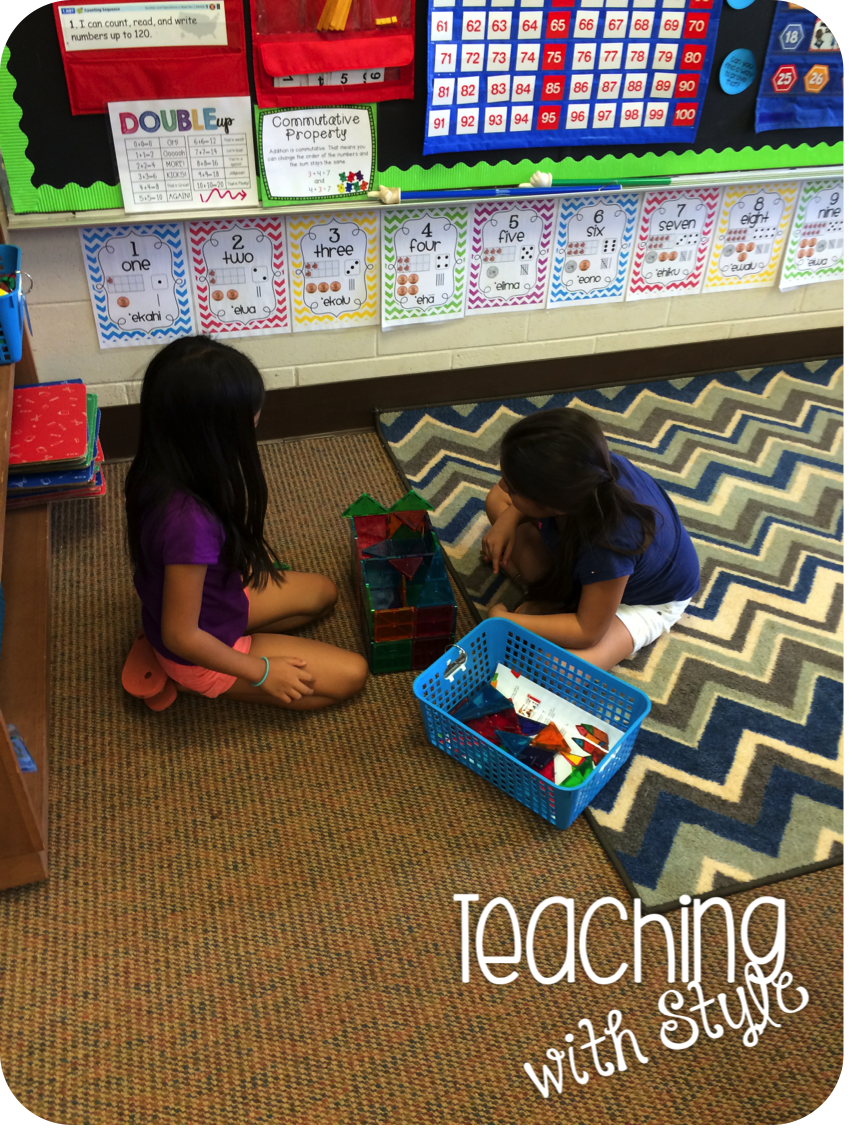
These girls picked Math Manipulatives and are building with Magnatiles.

These girls picked art.  They are painting with watercolors.

It's been busy around here! But we still manage to squeeze in some fun.  What has your class been up to during the past couple of weeks?


My new school has an amazing amount of technology in each classroom.  So much so that I needed to find creative ways to organize it all!

In my Classroom Tour post, I showed you my set up: 6 desktop computers (with dust covers that I sewed), a large rolling cart full of drawers to store tech stuffs, and a counter top with shoe organizers to hold and charge the laptops.


I've finally had time to sit down, organize, and label all the stuff in those drawers.  It looks great!

I made my labels for my TpT store, too! Mine have paper from Schoolgirl Style's Bugs decor pack that match my classroom design.  I made the ones for all of you with a slightly different rainbow background.  They actually match my Schedule Cards.  You'll love them! 

Click the picture to head to my TpT store

For my listening center in Daily 5, I use iPods with 5 audio books on each.  I label the book bags with the iPod color so students know which bag to grab.  

Click the picture to see my iPod Organization Labels on TpT

I wanted to organize my iPads with similar labels.  I have 6 iPads that I keep in a letter sorter thing from OfficeMax.  I plan to tape labels to the back of these covers.  I think it will help me identify which ones have been charged and which ones still need to be charged.  Right now, with 4 red and 2 grey, it's hard to keep straight which one is which.  I'm all about simple organization!
Click the picture to see my iPad Organization Labels on TpT

Are you thinking that maybe all these items would be good in your classroom? I just bundled them, along with my Keyboard Shortcuts for both PC and Mac and my Home Row Keyboarding Posters! My very first bundle! Woot! 

It's over 20% off the cost of buying these items individually!
Click the picture to see my Teaching With Technology Bundle on TpT

How do you organize your technology?

For today's Wish List Wednesday, I checked my number 2 most wishlisted item and it's my PC Keyboard Shortcuts posters!

And just because I love all of you oh so much, I decided to discount all four of my Teaching Technology series! All four are half off for today!

I used these sets to spruce up my school's computer lab.  There are no windows and the bulletin boards were full of ripped, faded paper and mis-matched borders.  I was running out of the letters I used, so I just made the ones work that I had.  It looks a million times better than before! 


If you are interested in decorating a computer lab or computer/iPod center in your classroom, go check them out! :)


I'm giving away all four of these products to one lucky reader! Enter the Rafflecopter below to win! 
a Rafflecopter giveaway


And head over to Owl-ways Be Inspired to see who else is participating!

When I first came to my school two years ago, the computer lab was a sad state of affairs.  It had faded, torn paper on the bulletin boards, thousands of random staples in the walls, and nothing helpful for the kids hanging on the walls.

Last year, I decided to spruce it up.  We don't have a computer teacher, so no one had taken ownership over the space.  I started out by actually making a schedule for when teachers used the lab.  Everyone had just used the same time year after year and no one knew when the lab was available.  It was a little strange to me.  I then removed all the weird staples in the walls, took down the gross paper, and put up bulletin borders.  I also put up my PC Shortcuts.

There is a Mac version, as well.


Recently, I decided to do a little more around the lab.  I asked one of the kindergarten teachers with really cute handwriting to write all the websites we use on the chalkboard with chalk markers.  
She forgot the www. on many of them.  Oops!

I used some labels in Schoolgirl Style's Chalkboard Rainbow set to make directions to label the different walls in the lab.  I decided to label them with islands and how far away they are for us.  Now, when I dismiss kids from their computers to line up and go back to the classroom, I say the direction or the island. 

The middle row of the lab, I labeled with our island.

I also decided to number the computers.  I just used little dot stickers I already had.  When my kids type stories, they have to use the same computer each time and save their work to the desktop.  Numbering the computers help them remember which one they used.

The last thing I did was create a Home row bulletin board.  We do Typing Web to help teach correct typing skills, but the kids do forget where to rest their fingers.

For the title, I ran out of o's in those cute cut-out letters, so I turned two 9's into o's.  It's not perfect, but it works. 


You can check out my Home Row posters on TpT.  Included are posters with the home row highlighted in yellow, in gray for black and white printing, or in blackline for printing on colored paper.  My school only has black and white printers, so I printed mine on white cardstock.  Also included are 3 different sizes of keyboards for display.  I chose to print and display the biggest keyboard, since the board I put the display on was so large.  

How is your computer lab? Do you have a media teacher or do teachers take care of the lab, like at my school?
Awhile ago, I shared with you my plan to convert old books on tape to MP3 and use them on iPods in my classroom.  Well, I am finally all finished!  I'm here with a tutorial today to show you everything I did!

First, I collected some supplies:
  • Tape player
  • 3.5mm cord
  • Books on tape with matching books
  • Download the free program Audacity

I made a little video for you to see how I did it.


Here are my bags of books hanging up.

I put 5 stories on each iPod.  I then put the books in a hanging bag and slapped one of my iPod Labels on the front.  The kids would take a bag and know instantly which iPod they needed.

Check out these labels on TpT!
Just to be safe, I keep my iPods in this safe tucked under my desk.  During reading time, I open it and my "Device Manager" (that's a class job) is in charge of passing them out.

If you have multiple of the same book, you could get this splitter to make the iPod a group center.
I also got some silicone cases for my ipods.  I felt like it would help the kids from dropping them on the floor.  
From left the right: my old nano from 6 years ago, my cousin's that she didn't use anymore, the purple one I was able to purchase with school supply money, and the last two were a generous donation from Donorschoose.  

Well, silly me, but I accidentally ordered too many covers!  So, I have 4 left: black, green, pink, and clear.  They fit the newest 7th Generation.  And I'm going to give them away!

This one will be short and sweet: just leave a comment below telling me if you can use them in your classroom.  I'll throw in a set of the organization labels, too.  But you better go quick!  The giveaway ends tonight at 10pm Hawaii Standard Time.

*****Edit 7/22/13******
I used my old 2007 Macbook Pro to convert my tapes.  I usually leave this laptop at school to use with my projector (the school gave us Netbooks, which don't work very well and you can't play discs on them, so I don't use mine).  I decided to use it to make my tutorial because I already had downloaded Audacity on it, so it was one less step.  

On my old Macbook, I plugged the 35 mm cord into the microphone jack:

A newer Mac doesn't have that jack, it just has the headphone.  So, you will need to purchase a USB adapter to make it work.

Hope that helps!  If you are still having problems or have questions, you can find many answers here.  I am not a technology genius, so this is all the help I'm equipped to give! Lol.

I'm linking up with Blog Hoppin!